Croatia • UK residents • Schengen visa appointments

Croatia Schengen Visa Appointment Monitoring for UK Applicants

Track Croatia Schengen visa appointment availability for VFS Global in the UK. Use AnySlot to check live openings for London, Manchester, or Edinburgh with on-demand scans or scheduled alerts before you book yourself on the official channel.

Free on-demand checks$25 for 10 days of automatic monitoringUnlimited slot alerts

Find a Croatia visa appointment without guessing when slots open

Service
Croatia: Schengen
Booking channel
VFS Global
Location
Edinburgh · London · Manchester
Software
AnySlot.app Auto Slot Monitoring Bot
Runs on
macOS 13+ and Windows 10+ x64
Alerts
App, sound and Telegram notifications

Croatia Schengen applications in the UK are submitted in person through the official VFS Global route, with centers in London, Manchester, and Edinburgh. The next month’s appointments are usually opened on the 15th, so timing matters if you want to catch a slot early and avoid repeated manual refreshes. If you are preparing a trip with fixed dates, watching the booking page closely can save time and help you react when availability appears.

AnySlot lets you monitor the official booking page on demand or on a schedule, then alerts you by app, sound, and optional Telegram when availability appears. It does not auto-book and it does not promise an appointment; you still complete the booking yourself on the official service. That makes it a practical check for applicants who want a quicker way to spot openings without relying on guesswork.

This page is for the Croatia Schengen route only. UK residence does not by itself remove visa requirements, and eligibility depends on your citizenship and travel purpose. If you need to apply in the UK, make sure your documents, online form, and appointment timing all match the Croatian checklist, including the in-person submission rule and the correct center for your location.

Interactive demo

Live appointment monitoring demo for Croatia Schengen UK slots

Get the desktop app

The demo above shows the interface only, with simulated results. Real monitoring runs in the downloaded app, in your own official booking session. On-demand checks are free; automatic monitoring is paid.

  1. Review the Croatia UK route and visa categoryCheck whether you need Schengen type C or another Croatian visa category before using the booking page.
  2. Prepare your documents and printed formMake sure the online application is completed, printed, and supported by the required documents for your trip purpose.
  3. Watch the official VFS page for openingsUse AnySlot to monitor the official Croatia booking page for appointment changes at your chosen center.
  4. Finish the booking yourselfOnce a slot appears, complete the reservation manually on the official service and attend in person.

Countries and visa appointment routes

Countries and visa appointment routes

Application country

United Kingdom

UK-based applicants can browse short visits separately from plans to move or stay longer. Explore 40 appointment routes, grouped below by service.

Schengen short stay

Long stay and residence

  • VFS GlobalVFS GlobalAutomatic slot searchAutomatic slot checking
  • VFS GlobalVFS GlobalAutomatic slot searchAutomatic slot checking
  • VFS GlobalVFS GlobalAutomatic slot searchAutomatic slot checking
  • VFS GlobalVFS GlobalAutomatic slot searchAutomatic slot checking
  • VFS GlobalVFS GlobalAutomatic slot searchAutomatic slot checking
  • VFS GlobalVFS GlobalAutomatic slot searchAutomatic slot checking
  • VFS GlobalVFS GlobalAutomatic slot searchAutomatic slot checking
  • VFS GlobalVFS GlobalAutomatic slot searchAutomatic slot checking
  • VFS GlobalVFS GlobalAutomatic slot searchAutomatic slot checking
  • VFS GlobalVFS GlobalAutomatic slot searchAutomatic slot checking
  • VFS GlobalVFS GlobalAutomatic slot searchAutomatic slot checking
  • VFS GlobalVFS GlobalAutomatic slot searchAutomatic slot checking
  • VFS GlobalVFS GlobalAutomatic slot searchAutomatic slot checking
  • VFS GlobalVFS GlobalAutomatic slot searchAutomatic slot checking
  • VFS GlobalVFS GlobalAutomatic slot searchAutomatic slot checking
  • VFS GlobalVFS GlobalAutomatic slot searchAutomatic slot checking
  • VFS GlobalVFS GlobalAutomatic slot searchAutomatic slot checking
  • VFS GlobalVFS GlobalAutomatic slot searchAutomatic slot checking
  • VFS GlobalVFS GlobalAutomatic slot searchAutomatic slot checking
  • BLS InternationalBLS InternationalAutomatic slot searchAutomatic slot checking

Quick guide

What to do before you book your Croatia appointment

Confirm whether you actually need a visa

Check your nationality against the Croatian rules before booking. A UK residence permit alone does not exempt you from the visa requirement, while UK nationals do not need a short-stay visa for visits up to 90 days in any 180-day period.

Use the correct UK booking route

If you are applying from the UK, the official intake is through VFS Global in London, Manchester, or Edinburgh. For family members of Croatian or other EEA nationals, the embassy may try to facilitate a manual appointment by email.

Complete the online form first

Fill in the Croatian online visa application form, print it, and bring it with your supporting documents. The photo uploaded in the system must match the photo on the printed form, and your name must match your passport.

Keep the timing rules in mind

Applications are generally submitted no more than six months before travel and, as a rule, no later than 15 calendar days before departure. Croatian authorities also say the visa can be issued only if Croatia is your main destination.

Prepare for in-person biometrics and fees

You must apply in person and provide fingerprints unless exempt. For Schengen type C, the fee is 78.28 GBP, with some exemptions; for type D, the fee is 82.48 GBP and card payment is required. VFS service fees apply when submitting there.

Interface examples

Inside the AnySlot panel

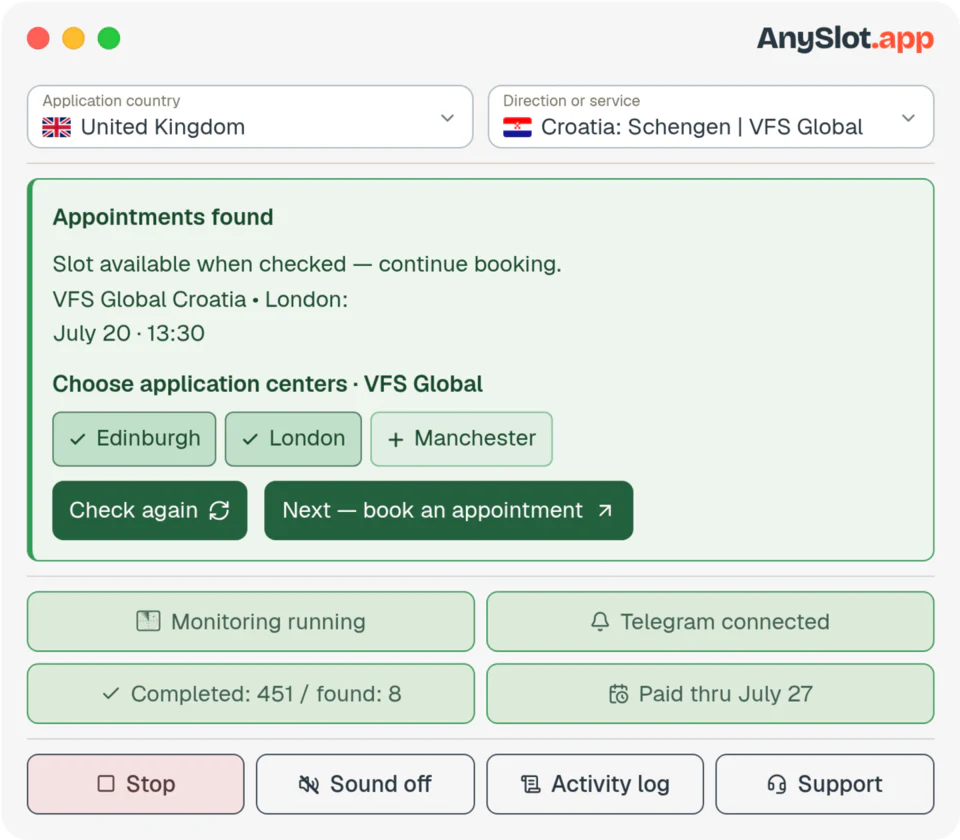
Croatia Schengen Visa Appointment Monitoring for UK Applicants — Screenshot — AnySlot application window on macOS
Screenshot — AnySlot application window on macOS
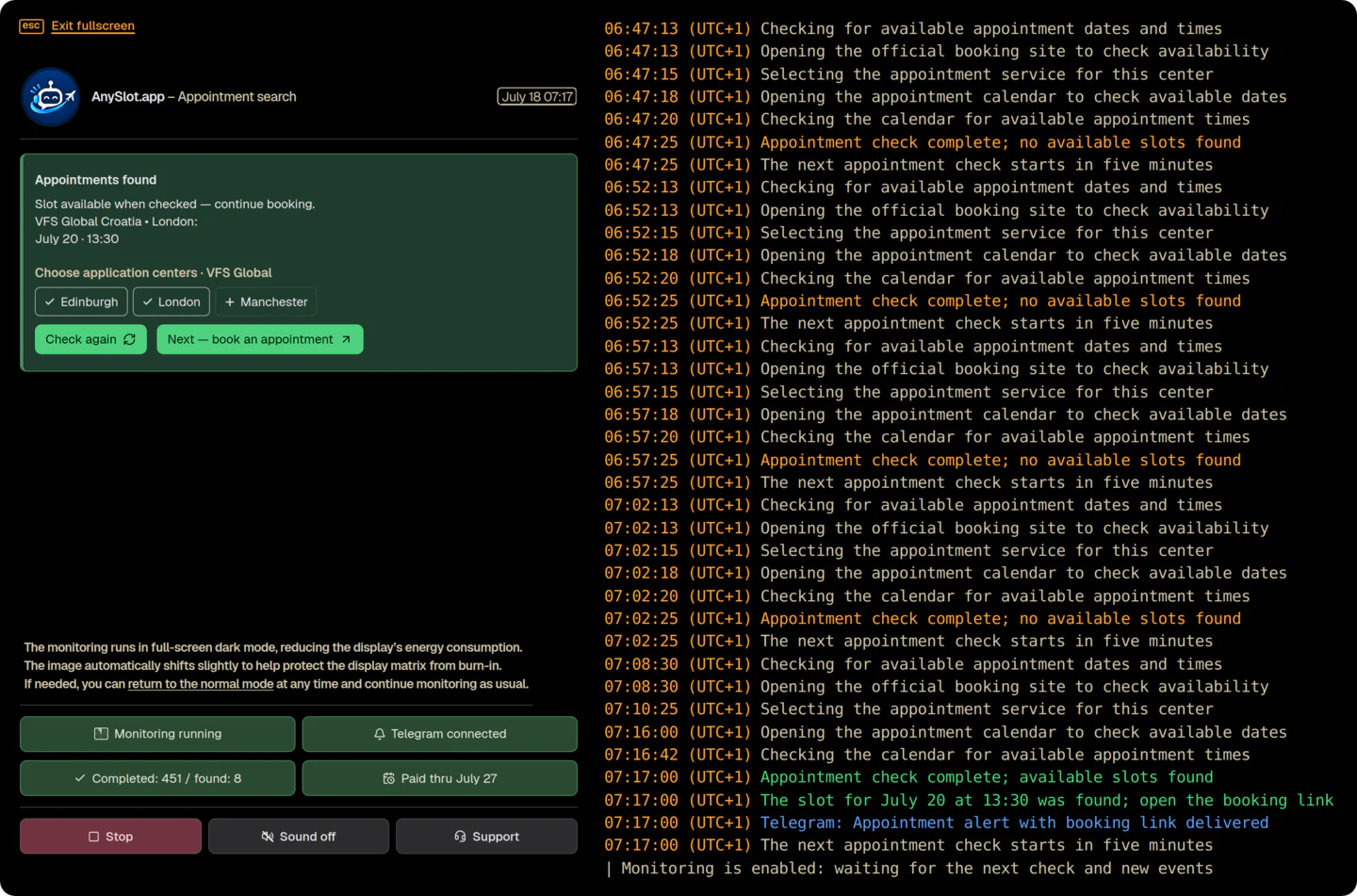
Croatia Schengen Visa Appointment Monitoring for UK Applicants — Screenshot — AnySlot energy-saving fullscreen mode
Screenshot — AnySlot energy-saving fullscreen mode

Functions and advantages

Key features for Croatia Schengen monitoring

  • Official-route checks

    Monitor the Croatia UK VFS Global booking page for availability changes tied to London, Manchester, or Edinburgh.

  • Useful alert options

    Get notified by app, sound, and optional Telegram when the page changes, so you can return quickly and book yourself.

  • Flexible checking

    Use free on-demand checks when you want a quick look, or activate scheduled monitoring when appointment releases matter most.

AnySlot appointment monitoring for Croatia Schengen visa slots in the UK

Start monitoring Croatia appointments now

Check the official Croatia VFS Global page with AnySlot, then book yourself as soon as a slot appears. Free on-demand checks are available, and scheduled monitoring can keep watching for 10 consecutive days if you need ongoing alerts. The app must stay running on an awake computer, and it does not auto-book or guarantee success.

  • 10 days of monitoring with unlimited slot alerts.
  • Desktop sound and Telegram alerts
  • Code works on Mac or Windows

$25$5010 days of bot checks

Free on-demand checks after download

AnySlot supports macOS 13+ and Windows 10+ x64. Scheduled monitoring is a paid preview feature here; live UK compatibility has not been verified in this page, so use the free check first. The app must stay running on an awake computer.

What you gain

Croatia’s UK appointments are not a walk-in system, and the next month often opens only once a month. Monitoring helps you react when the official booking page shows fresh availability instead of checking blindly throughout the day.

Why monitor the Croatia booking page with AnySlot

AnySlot is built for this route’s official channel. It supports free on-demand checks and scheduled monitoring, with alerts if the page changes. That is useful when you need a specific center or you are waiting for the month’s release window.

The app must stay running on an awake computer, and you still book personally on the official website. That keeps the process simple: watch for a slot, open the booking page fast, and complete the reservation yourself.

Checks while you work or rest

Let AnySlot check while you work or sleep. Keep your computer on, online, and awake.

Alerts on screen, with sound, and in Telegram

See results on screen, hear an alert if sound is on, and get a message on your phone if Telegram is connected.

Your account, your booking

Sign in to your own account and complete the booking yourself. Your password and application details stay with you.

Each center reported separately

When several selected centers are checked, each available appointment is shown with its center.

A clear activity log

See when each check ran, what it found, and whether the booking site reported an error.

Free mode

Run a free check whenever you need one, including on beta routes.

How it works

How Croatia UK appointment monitoring works

  1. Step 1

    Choose the Croatia route

    Select the Croatia Schengen route for the UK rather than a generic Schengen country page. This keeps monitoring tied to the correct VFS Global booking URL and the correct centers.

  2. Step 2

    Start a check

    Run a free on-demand check to see whether the page currently shows appointments or whether the booking flow is still closed or unavailable.

  3. Step 3

    Set monitoring if needed

    If you want ongoing tracking, activate scheduled monitoring for 10 consecutive days. AnySlot sends alerts when it detects a change, so you can return to the official page promptly.

  4. Step 4

    Book on the official site

    When a slot appears, complete the booking yourself on the VFS Global website. AnySlot does not reserve appointments, and it cannot guarantee visa approval or appointment success.

FAQ

Croatia Schengen visa appointments and booking FAQs

Support

Need help installing or activating AnySlot?