United Kingdom → Sweden · Schengen visa

Sweden Schengen Visa Appointment Monitoring from the UK

Need a Sweden Schengen appointment from the UK, but the right VFS slot is hard to catch? AnySlot helps you watch supported booking pages and alert you when availability changes. The booking flow here uses VFS Global, while application processing is handled by the Swedish Migration Agency.

Free on-demand checks$25 for 10 days of automatic monitoringUnlimited slot alerts

A practical way to watch Sweden Schengen appointments

Service
Sweden: Schengen
Booking channel
VFS Global
Location
Edinburgh · London
Software
AnySlot.app Auto Slot Monitoring Bot
Runs on
macOS 13+ and Windows 10+ x64
Alerts
App, sound and Telegram notifications

If you are applying for a Sweden Schengen visa from the UK, the key step is finding an appointment in the correct booking flow. The Embassy of Sweden in the UK does not process visa applications or handle Schengen visa matters; the Swedish Migration Agency is responsible for processing. AnySlot helps you monitor the appointment side without changing the official process.

This route uses the VFS Global UK → Sweden booking page, including the option to book, reschedule if you already have an appointment, and track an application after submission. That makes it useful when you already know your visa purpose and just need a better way to follow slot changes. It does not book for you or guarantee an outcome.

AnySlot is built for supported routes where checking repeatedly is tiring or time-sensitive. You keep control of the application, use the official portal for submission, and receive alerts on the devices you choose. The app must keep running on an awake Mac or Windows PC, so monitoring stays tied to your own setup rather than a fully automated service.

Interactive demo

Demo check for Sweden Schengen appointments

Get the desktop app

The demo above shows the interface only, with simulated results. Real monitoring runs in the downloaded app, in your own official booking session. On-demand checks are free; automatic monitoring is paid.

  1. Confirm the correct country routeThis page is for Sweden appointments from the United Kingdom, not another Schengen destination.
  2. Use the official booking channelFollow the VFS Global booking page and the linked e-application portal for submission.
  3. Track the application after filingUse the tracking link if you want status updates after you submit.
  4. Stay in control of the final bookingAnySlot notifies you; you decide whether to take the slot and complete the booking.

Countries and visa appointment routes

Countries and visa appointment routes

Application country

United Kingdom

UK-based applicants can browse short visits separately from plans to move or stay longer. Explore 40 appointment routes, grouped below by service.

Schengen short stay

Long stay and residence

  • VFS GlobalVFS GlobalAutomatic slot searchAutomatic slot checking
  • VFS GlobalVFS GlobalAutomatic slot searchAutomatic slot checking
  • VFS GlobalVFS GlobalAutomatic slot searchAutomatic slot checking
  • VFS GlobalVFS GlobalAutomatic slot searchAutomatic slot checking
  • VFS GlobalVFS GlobalAutomatic slot searchAutomatic slot checking
  • VFS GlobalVFS GlobalAutomatic slot searchAutomatic slot checking
  • VFS GlobalVFS GlobalAutomatic slot searchAutomatic slot checking
  • VFS GlobalVFS GlobalAutomatic slot searchAutomatic slot checking
  • VFS GlobalVFS GlobalAutomatic slot searchAutomatic slot checking
  • VFS GlobalVFS GlobalAutomatic slot searchAutomatic slot checking
  • VFS GlobalVFS GlobalAutomatic slot searchAutomatic slot checking
  • VFS GlobalVFS GlobalAutomatic slot searchAutomatic slot checking
  • VFS GlobalVFS GlobalAutomatic slot searchAutomatic slot checking
  • VFS GlobalVFS GlobalAutomatic slot searchAutomatic slot checking
  • VFS GlobalVFS GlobalAutomatic slot searchAutomatic slot checking
  • VFS GlobalVFS GlobalAutomatic slot searchAutomatic slot checking
  • VFS GlobalVFS GlobalAutomatic slot searchAutomatic slot checking
  • VFS GlobalVFS GlobalAutomatic slot searchAutomatic slot checking
  • VFS GlobalVFS GlobalAutomatic slot searchAutomatic slot checking
  • BLS InternationalBLS InternationalAutomatic slot searchAutomatic slot checking

UK to Sweden booking guide

Check the category, portal, and center before you search

Use the correct booking page

For this direction, the official route is the VFS Global UK → Sweden appointment page. Start there if you need a new appointment or a reschedule. The page also links to application tracking and local center information, so you can stay on the same official route instead of guessing which site to use.

Confirm who processes the visa

The Embassy of Sweden in the United Kingdom is not responsible for processing visa applications and should not be contacted for Schengen visa matters. The Swedish Migration Agency in Sweden processes the visa application. That matters because the booking page is only one part of the route; the actual decision-maker is elsewhere.

Use the e-application portal

The page says you need to submit your application through the e-application portal linked from VFS. Treat the appointment as the next step in a wider application process, not as the application itself. Prepare your form and supporting documents before you rely on slot availability.

Check the center information

Use the Find a center link to see information about your local center before booking. That helps you avoid selecting a location blindly and then discovering the center is not the right one for your situation or travel plans.

Track after you apply

If you already filed, the same route provides Track your application. That is separate from booking an appointment, but it helps you stay on the official path after submission rather than switching between unrelated pages or unofficial status checks.

Interface examples

Inside the AnySlot panel

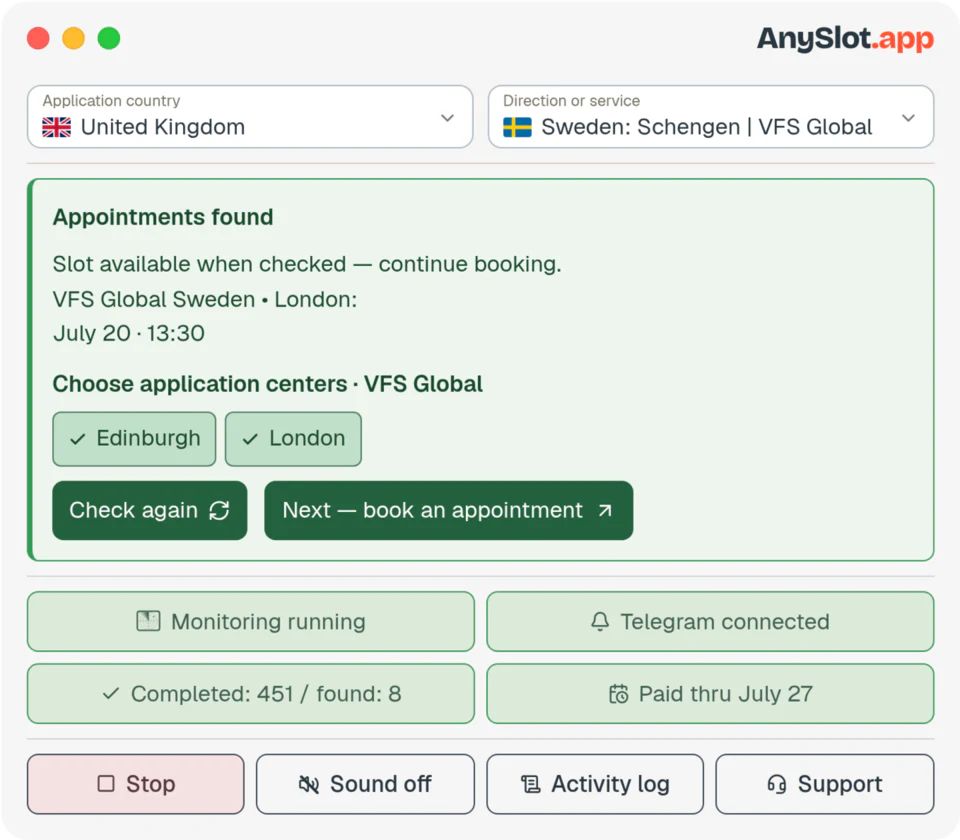
Sweden Schengen Visa Appointment Monitoring from the UK — Screenshot — AnySlot application window on macOS
Screenshot — AnySlot application window on macOS
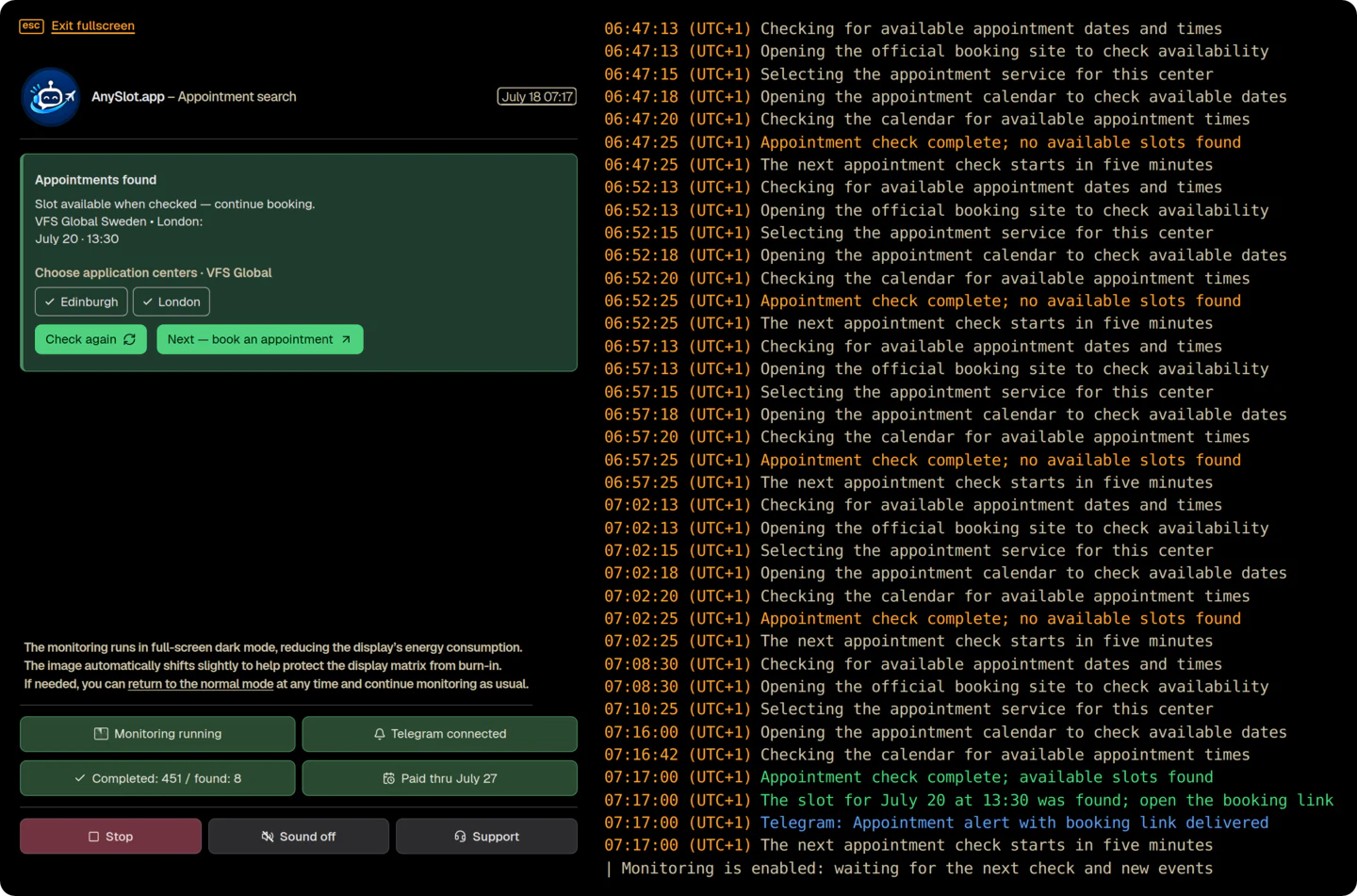
Sweden Schengen Visa Appointment Monitoring from the UK — Screenshot — AnySlot energy-saving fullscreen mode
Screenshot — AnySlot energy-saving fullscreen mode

Functions and advantages

AnySlot features for this route

  • Route-specific monitoring

    Watch the official UK → Sweden VFS booking page and get alerted when availability changes on the supported route.

  • Manual booking only

    You stay in control of the official appointment. AnySlot notifies you; it does not auto-book or guarantee a slot.

  • App, sound, and Telegram alerts

    Choose how you want to be notified, including in-app alerts, sound, and optional Telegram messages.

Sweden Schengen appointment monitoring

Start monitoring Sweden appointments

Use AnySlot to follow the Sweden Schengen booking route from the UK with free on-demand checks and paid scheduled monitoring when you need repeated alerts. You still book manually on the official VFS site. Live UK compatibility has not been verified here, so check the free preview first.

  • 10 days of monitoring with unlimited slot alerts.
  • Desktop sound and Telegram alerts
  • Code works on Mac or Windows

$25$5010 days of bot checks

Free on-demand checks after download

Live UK compatibility has not been verified here. Review preview only; purchase is disabled until a successful free check confirms the route.

What you gain

Sweden Schengen appointments can disappear quickly, and the official route is already split between booking, rescheduling, center lookup, and tracking. AnySlot keeps checking the supported page so you do not have to refresh it yourself all day.

Why people use AnySlot for this route

You get alerts in the app, with sound and optional Telegram support, so you can react when a slot appears. The service is for manual booking on the official site; it does not auto-book, promise an appointment, or claim government affiliation.

Free on-demand checks are available, and scheduled monitoring costs $25 for 10 consecutive days from first code activation. The app must stay running on macOS 13+ or Windows 10+ x64 with the computer awake.

Checks while you work or rest

Let AnySlot check while you work or sleep. Keep your computer on, online, and awake.

Alerts on screen, with sound, and in Telegram

See results on screen, hear an alert if sound is on, and get a message on your phone if Telegram is connected.

Your account, your booking

Sign in to your own account and complete the booking yourself. Your password and application details stay with you.

Each center reported separately

When several selected centers are checked, each available appointment is shown with its center.

A clear activity log

See when each check ran, what it found, and whether the booking site reported an error.

Free mode

Run a free check whenever you need one, including on beta routes.

How it works

How the monitoring flow works

  1. Step 1

    Open the Sweden route

    Set up AnySlot for the UK → Sweden Schengen direction and open the supported booking page in the official VFS flow.

  2. Step 2

    Check the live availability

    Run a free on-demand check first where supported. Review previews do not verify live compatibility for every route, so treat the result as a check, not a guarantee.

  3. Step 3

    Activate scheduled monitoring

    If you want repeated checks, activate a code for 10 consecutive days from the first activation. Keep the app running and the computer awake.

  4. Step 4

    Book manually on VFS

    When you receive an alert, return to the official VFS page and complete the appointment yourself. AnySlot only helps you notice the change faster.

FAQ

Sweden Schengen visa from the UK: questions

Support

Need help installing or activating AnySlot?