United Kingdom → Switzerland · Schengen visa

Switzerland Schengen Visa Appointment Monitoring from the UK

Need a Switzerland Schengen appointment from the UK and don’t want to keep refreshing VFS all day? AnySlot helps you watch for dates on supported routes and alerts you in the app, with optional Telegram notifications. Review the demo for UK → Switzerland; it shows the interface only and does not confirm live-calendar compatibility.

Free on-demand checks$25 for 10 days of automatic monitoringUnlimited slot alerts

Short-stay categories need the right booking channel

Service
Switzerland: Schengen
Booking channel
VFS Global
Location
Edinburgh · London · Manchester
Software
AnySlot.app Auto Slot Monitoring Bot
Runs on
macOS 13+ and Windows 10+ x64
Alerts
App, sound and Telegram notifications

For Switzerland’s short-stay visa categories, the official VFS Global page in the UK lists the visa types you can select, including Business, Tourism, Family or Friends Visit, Sports, Study and Culture, Minors, and EU/EEA and Swiss Family. The appointment path is separate from national visa submissions, so choosing the correct category matters before you look for a date.

Your UK residence and passport are separate questions, and the right way to book depends on both. Don’t assume every non-British resident needs a visa or that a UK address changes the visa category you must use. Check your own nationality and purpose of travel against the official Switzerland route before booking.

AnySlot is for monitoring availability, not auto-booking. You still make the appointment yourself on the official service, and the app must keep running on an awake computer. Scheduled monitoring is a paid feature; live UK compatibility has not been verified here, so the preview is best used to inspect the workflow before deciding whether to purchase.

Interactive demo

Switzerland Schengen slot monitoring demo for UK applicants

Get the desktop app

The demo above shows the interface only, with simulated results. Real monitoring runs in the downloaded app, in your own official booking session. On-demand checks are free; automatic monitoring is paid.

  1. Check the visa category firstPick the short-stay purpose that matches your trip to Switzerland.
  2. Verify your status documentsMatch passport, UK residence evidence, and checklist items to the official instructions.
  3. Monitor the live calendarUse AnySlot to watch the selected centers for changes in availability.
  4. Confirm on the official siteOnly the official VFS booking flow finalizes the appointment.

Countries and visa appointment routes

Countries and visa appointment routes

Application country

United Kingdom

UK-based applicants can browse short visits separately from plans to move or stay longer. Explore 40 appointment routes, grouped below by service.

Schengen short stay

Long stay and residence

  • VFS GlobalVFS GlobalAutomatic slot searchAutomatic slot checking
  • VFS GlobalVFS GlobalAutomatic slot searchAutomatic slot checking
  • VFS GlobalVFS GlobalAutomatic slot searchAutomatic slot checking
  • VFS GlobalVFS GlobalAutomatic slot searchAutomatic slot checking
  • VFS GlobalVFS GlobalAutomatic slot searchAutomatic slot checking
  • VFS GlobalVFS GlobalAutomatic slot searchAutomatic slot checking
  • VFS GlobalVFS GlobalAutomatic slot searchAutomatic slot checking
  • VFS GlobalVFS GlobalAutomatic slot searchAutomatic slot checking
  • VFS GlobalVFS GlobalAutomatic slot searchAutomatic slot checking
  • VFS GlobalVFS GlobalAutomatic slot searchAutomatic slot checking
  • VFS GlobalVFS GlobalAutomatic slot searchAutomatic slot checking
  • VFS GlobalVFS GlobalAutomatic slot searchAutomatic slot checking
  • VFS GlobalVFS GlobalAutomatic slot searchAutomatic slot checking
  • VFS GlobalVFS GlobalAutomatic slot searchAutomatic slot checking
  • VFS GlobalVFS GlobalAutomatic slot searchAutomatic slot checking
  • VFS GlobalVFS GlobalAutomatic slot searchAutomatic slot checking
  • VFS GlobalVFS GlobalAutomatic slot searchAutomatic slot checking
  • VFS GlobalVFS GlobalAutomatic slot searchAutomatic slot checking
  • VFS GlobalVFS GlobalAutomatic slot searchAutomatic slot checking
  • BLS InternationalBLS InternationalAutomatic slot searchAutomatic slot checking

How the route works

Use the correct visa type, then watch the right calendar

Pick the correct short-stay category

Switzerland’s UK VFS page asks you to choose the visa type first so you can see the relevant fee, documents, forms, photo specifications, and processing times. That means the booking search starts with purpose, not with the city or the fastest available date. If your travel purpose is business, tourism, family visit, sports, study, culture, or a minor application, choose the matching option before you begin the appointment search.

Separate nationality from UK residence

Being resident in the UK does not automatically make you visa-exempt, and not every non-British resident needs the same travel document. Your passport nationality, your immigration status in the UK, and your Switzerland travel purpose are distinct checks. If you rely on a UK digital immigration status or eVisa, use the current official checklist for proof of status; don’t treat a physical document as the only valid option unless the checklist specifically asks for it.

Use the official booking channel

For this direction, short-stay applications route through VFS Global. A live calendar is the booking surface to monitor; email instructions or walk-in notes are not the same thing. If the route you need is not short-stay, stop and verify the national visa channel separately instead of using a Schengen calendar by habit.

Choose a UK center that fits your trip

The page identifies Edinburgh, London, and Manchester as the demo centers, which helps you understand the interface and how a search is structured. In a real booking, the center choice should match the official options for your route and your practical travel plans. Availability can vary by center, so monitoring more than one location can be useful when you are trying to secure a date.

Finish the booking yourself

When an alert arrives, open the official VFS service immediately and complete the appointment under the platform’s own rules. AnySlot can tell you a slot may be visible, but it cannot reserve the place for you or guarantee approval of the visa. Keep your passport details, category choice, and supporting documents ready so you can move quickly once a suitable date appears.

Interface examples

Inside the AnySlot panel

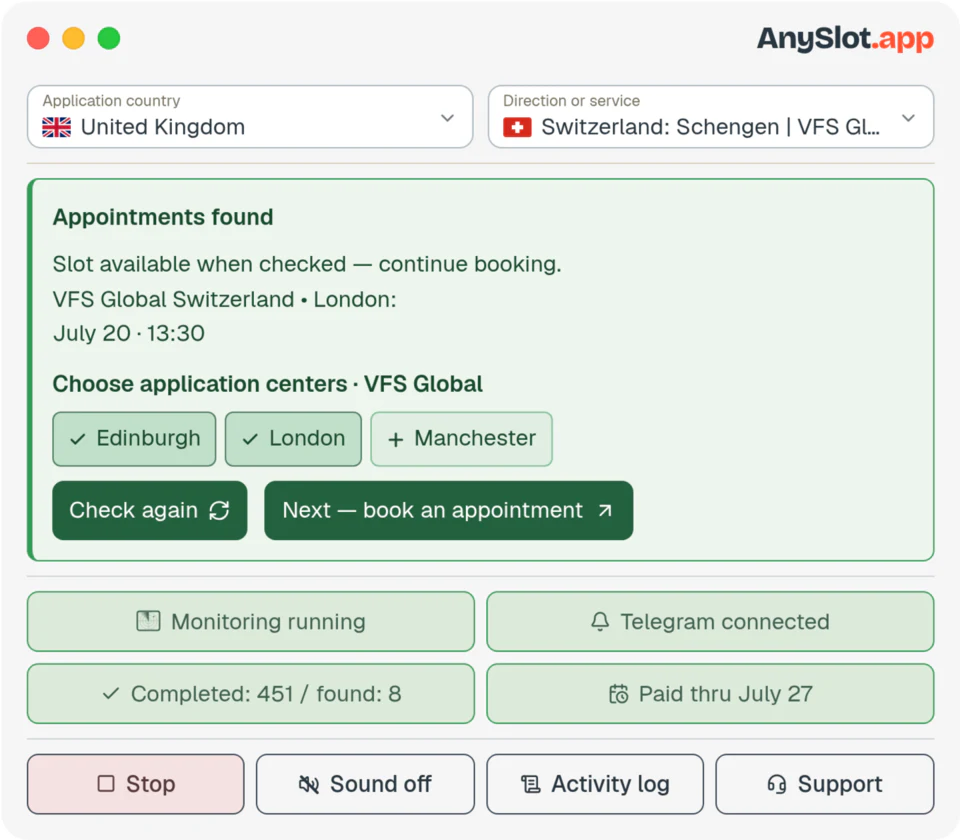
Switzerland Schengen Visa Appointment Monitoring from the UK — Screenshot — AnySlot application window on macOS
Screenshot — AnySlot application window on macOS
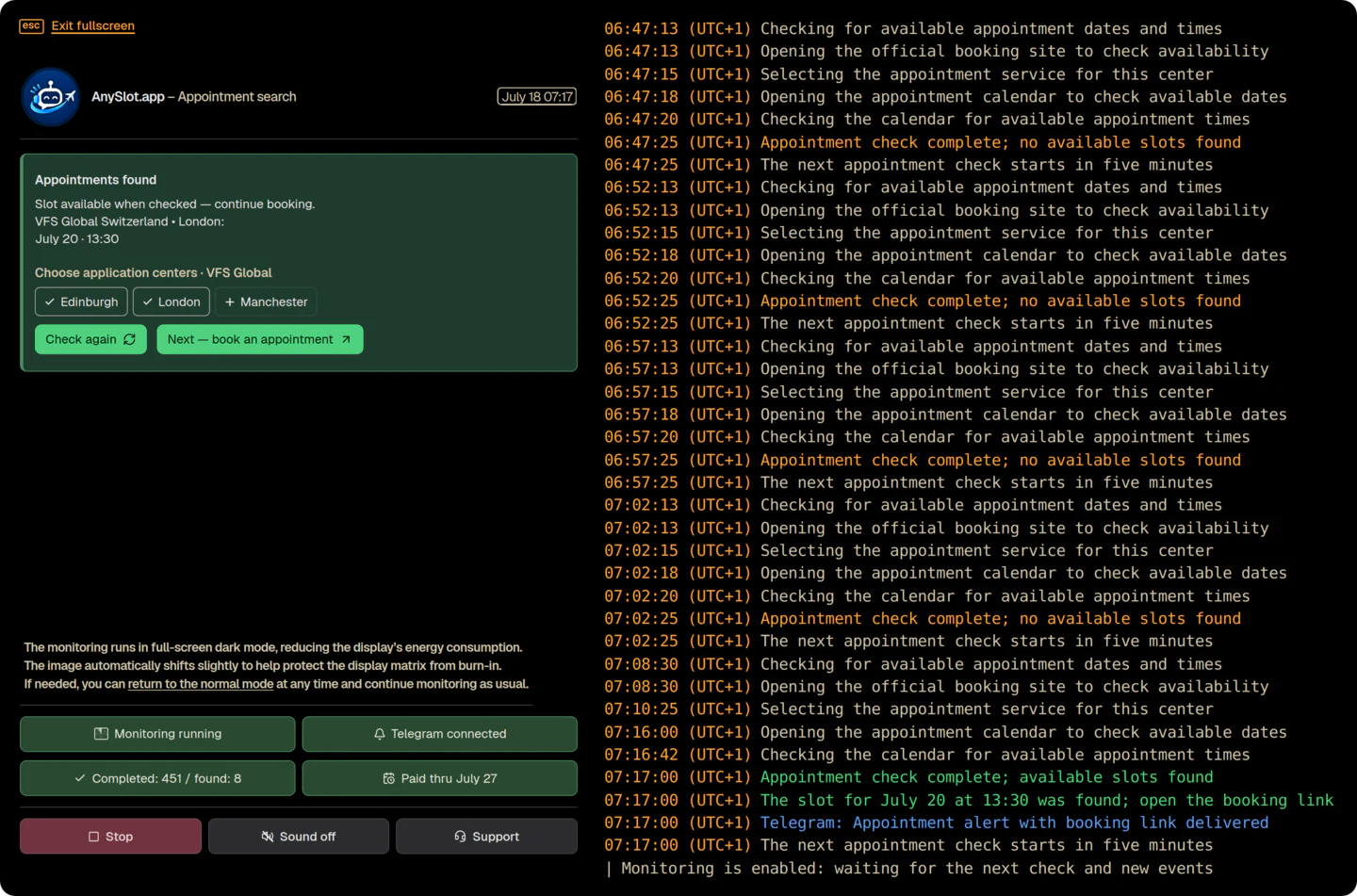
Switzerland Schengen Visa Appointment Monitoring from the UK — Screenshot — AnySlot energy-saving fullscreen mode
Screenshot — AnySlot energy-saving fullscreen mode

Functions and advantages

What AnySlot helps you do

  • Watch the live calendar

    Track the selected Switzerland UK booking route and get alerted when availability changes on the official service.

  • Choose the right centers

    Monitor Edinburgh, London, and Manchester from one setup instead of checking each location manually.

  • Stay notified

    Use app alerts, sound, and optional Telegram so you can act quickly when a slot appears.

AnySlot Switzerland Schengen appointment monitoring

Start monitoring Switzerland UK availability

AnySlot helps you watch the Switzerland Schengen booking flow from the UK and alert you when dates appear. Scheduled monitoring costs $25 for 10 consecutive days from first code activation. The demo is available for review, but live UK compatibility has not been verified here.

  • 10 days of monitoring with unlimited slot alerts.
  • Desktop sound and Telegram alerts
  • Code works on Mac or Windows

$25$5010 days of bot checks

Free on-demand checks after download

Live UK compatibility has not been verified here. Review the demo first; it does not prove a live calendar connection.

What you gain

Short-stay Switzerland bookings can be time-sensitive, especially when you are trying to align travel plans, document preparation, and a specific center. Monitoring reduces the need to keep checking by hand and gives you a clear alert when something changes on the route you selected.

Why monitor instead of refreshing manually

AnySlot’s alerts can appear in the app, with sound and optional Telegram delivery, so you don’t have to sit in front of the calendar all day. The app must stay open and your computer awake, which makes it a practical helper rather than a background booking agent.

On this page, the demo is there to preview the workflow, not to promise a live result. Live UK compatibility has not been verified here, so the safest approach is to review the interface first and only decide on purchase after a successful real free check on the supported route.

Checks while you work or rest

Let AnySlot check while you work or sleep. Keep your computer on, online, and awake.

Alerts on screen, with sound, and in Telegram

See results on screen, hear an alert if sound is on, and get a message on your phone if Telegram is connected.

Your account, your booking

Sign in to your own account and complete the booking yourself. Your password and application details stay with you.

Each center reported separately

When several selected centers are checked, each available appointment is shown with its center.

A clear activity log

See when each check ran, what it found, and whether the booking site reported an error.

Free mode

Run a free check whenever you need one, including on beta routes.

How it works

How the Switzerland UK monitoring flow works

  1. Step 1

    Select the route

    Choose Switzerland Schengen from the UK and the relevant short-stay category in AnySlot. This page is for the VFS Global booking channel, not a national visa email process.

  2. Step 2

    Open the official calendar

    Use the official VFS booking service for the UK route and keep the correct center selected. If your application is not short-stay, stop and confirm the other channel first.

  3. Step 3

    Start monitoring

    Set up alerts for the center or centers you want. Scheduled monitoring runs for 10 consecutive days from first code activation, and the app must remain active on an awake computer.

  4. Step 4

    Book manually when alerted

    If a slot appears, go to the official service and complete the appointment yourself. AnySlot does not auto-book or guarantee that a visa appointment will be secured.

FAQ

Switzerland Schengen from UK: common questions

Support

Need help installing or activating AnySlot?