National visa · US → Austria · VFS Global

Austria national D visa appointments at VFS Global USA

Austria’s VFS service for the USA lists national visa D separately from Schengen visa C and airport transit visa A. AnySlot watches the D appointment calendar from your desktop and alerts you when it detects availability, while you confirm that a visa D is the correct route for your purpose and stay length.

Free on-demand checks$25 for 10 days of automatic monitoringUnlimited slot alerts

A D visa is its own Austrian category

Service
Austria national visa (type D)
Booking channel
VFS Global for Austria
Location
VFS Global centers in the United States
Software
AnySlot.app Auto Slot Monitoring Bot
Runs on
macOS 13+ and Windows 10+ x64
Alerts
App, sound and Telegram notifications

VFS Global’s Austria page for the United States separates Schengen visa C, Austrian national visa D, and airport transit visa A. This route follows only the D calendar, so results are limited to that visa type rather than mixed with short-stay appointments.

An Austrian visa D is not the same thing as a residence permit. The Austrian Consulate General in Los Angeles explains that visa D covers stays of 91 days to 6 months, while intended stays beyond 6 months require a residence permit under a different process.

Purpose matters within the D category as well. Austria publishes specific examples such as long-term visits, collecting a residence permit, job-seeker travel, working holiday cases, and certain temporary work situations, so confirm the form and document path that matches your actual reason for travel before you book.

AnySlot only monitors the configured appointment calendar on your computer. It does not assess eligibility, prepare your file, pay official fees, or complete the booking session, so you remain responsible for choosing the correct service and finishing the appointment on the official site.

Interactive demo

Try the Austria national visa VFS bot

Get the desktop app

The demo above shows the interface only, with simulated results. Real monitoring runs in the downloaded app, in your own official booking session. On-demand checks are free; automatic monitoring is paid.

  1. Pick the exact calendarIn AnySlot, choose United States as the application country, then Austria and the national visa D entry. The bot follows that VFS Global category only, not other services for the same country.
  2. Select centers you can useSelect the US VFS cities you can reach for a national visa appointment. Run a free on-demand check first to see how the calendar responds today.
  3. Turn on automatic checksActivate a code to let the desktop app repeat checks for 10 days. Keep the computer awake and online; alerts arrive in the app, with sound and, if you connect it, Telegram.
  4. Book in your own sessionWhen a date is reported, open your own VFS Global account, confirm the center, category and time, and finish the booking yourself. AnySlot never holds or submits an appointment.

Countries and visa appointment routes

Countries and visa appointment routes

Application country

United States

Applying from the United States? Look for your application type, not just the destination flag. Explore 29 appointment routes, grouped below by service.

Schengen short stay

Long stay and residence

Austria D from the US

Five checks for an Austrian national visa

Visa or residence title

Start by confirming whether your case is truly an Austrian visa D. Austria states that stays over 6 months require a residence permit, and some travel purposes may involve a residence process plus a later visa only for entry or collection.

Purpose drives documents

A visa D is not one uniform file. The supporting forms and evidence depend on why you are traveling, such as a long family visit, job-seeker stay, temporary work, or collecting an approved residence permit, so review the purpose-specific Austrian instructions before taking the appointment.

Not a Schengen C slot

Do not treat a D appointment as interchangeable with Schengen C. Austrian guidance describes C as the short-stay route for up to 90 days per 180 days, while D covers a different legal category, so make sure the booking page shows national visa D before you confirm anything.

Centers you can attend

Choose only the U.S. centers you could actually travel to for an appointment. The list configured in the app is for monitoring convenience and should not be read as a statement of nationwide jurisdiction, so check the current Austrian mission or VFS instructions for where your application may be lodged.

Booking yourself

When AnySlot reports availability, open your own official booking session and verify the service, center, and appointment details live. Then complete the reservation yourself, because the app can report an opening but does not lock the slot or transmit an application.

Interface examples

Inside the AnySlot panel

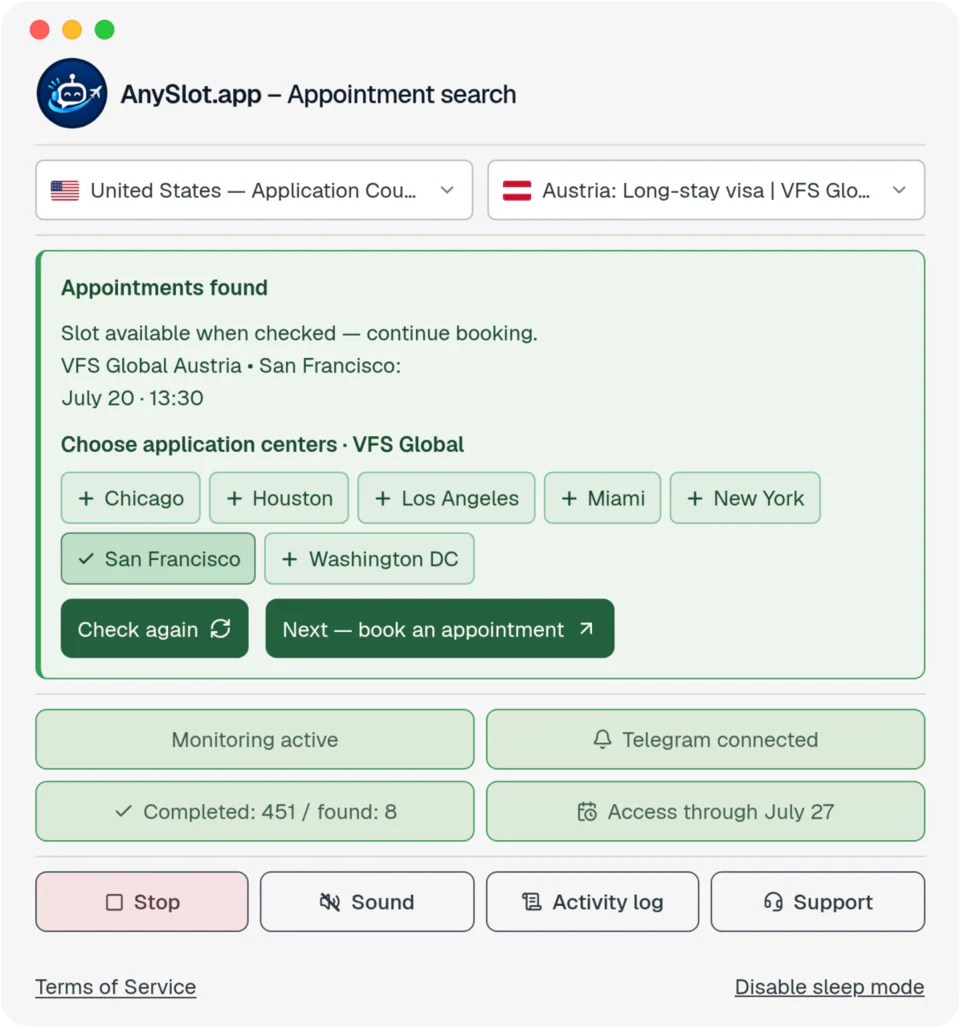
Austria national D visa appointments at VFS Global USA — Screenshot — AnySlot application window on macOS
Screenshot — AnySlot application window on macOS
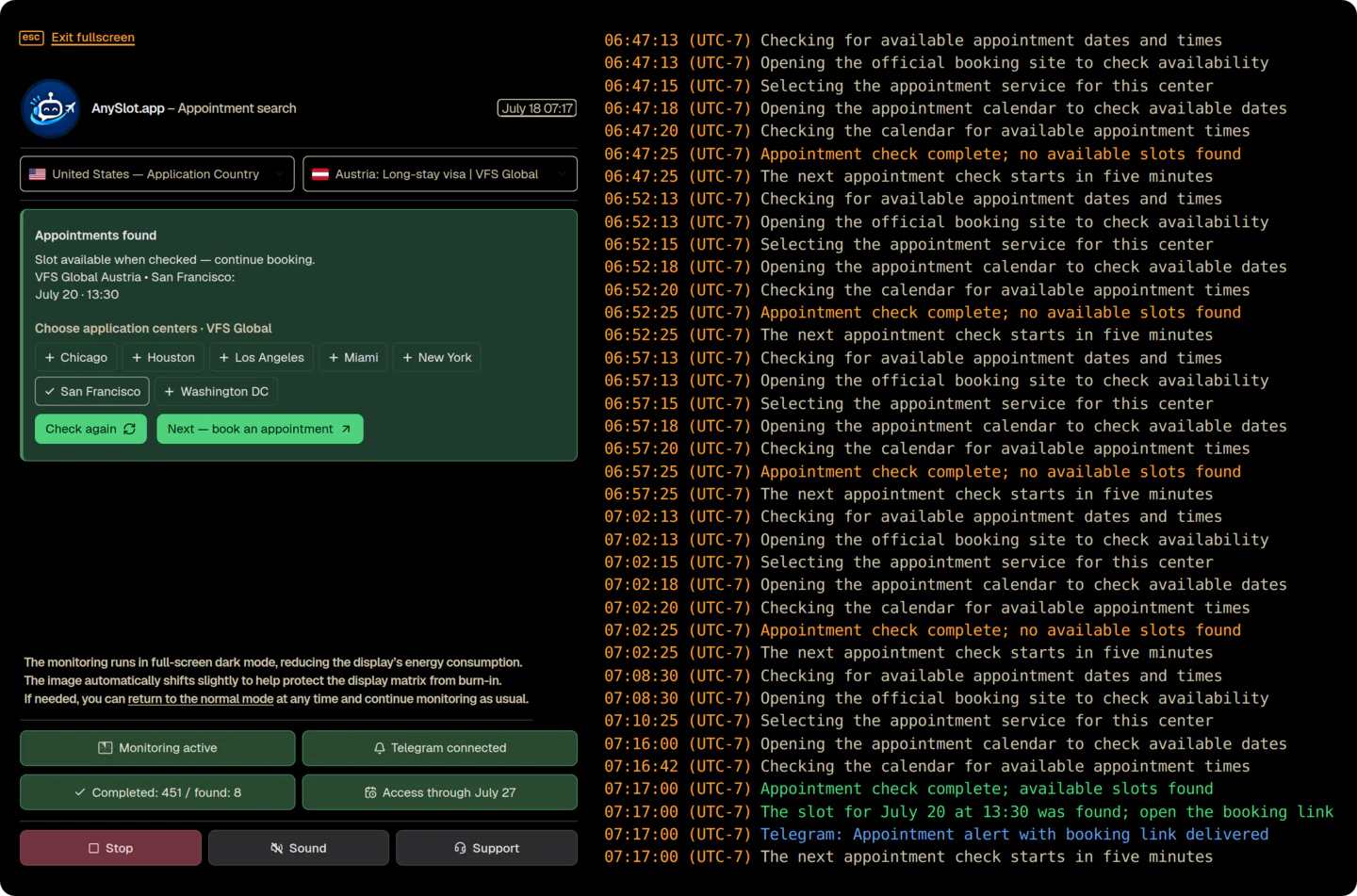
Austria national D visa appointments at VFS Global USA — Screenshot — AnySlot energy-saving fullscreen mode
Screenshot — AnySlot energy-saving fullscreen mode

Functions and advantages

Austrian D visa alerts for long stays

  • A separate D search

    The app monitors Austria’s national visa D category specifically, so Schengen C or airport transit A results are not mixed into this route. That helps when you already know your case belongs under the D visa path and want to watch that calendar only.

  • Time to gather purpose documents

    While the app performs repeated checks, you can focus on the file itself. Austrian visa D applications are purpose-specific, so that extra time is better used confirming the right form, supporting evidence, and whether your case is truly a visa application rather than a residence-permit procedure.

  • Austrian D check history

    Each check result is logged with its time on your computer, so you can see whether the app found no availability, encountered a failed check, or detected an opening. That record is useful for following the route without manually refreshing the official site throughout the day.

Austria national visa bot

Start monitoring Austrian D dates

$25 covers 10 consecutive days of automatic checks for this Austria national D search, counted from the first activation of your code. On-demand checks stay free. The payment is for the AnySlot software, not for an appointment, a VFS Global service charge or a consular fee.

  • 10 days of monitoring with unlimited slot alerts.
  • Desktop sound and Telegram alerts
  • Code works on Mac or Windows

$25$5010 days of bot checks

Free on-demand checks after download

What you gain

AnySlot checks the Austrian visa D appointment calendar from your own computer and records each result in a dated activity log. It is independent desktop software, not an official booking channel, and it cannot create availability or convert a failed check into an opening.

Watch D dates while you prepare

That separation is useful on Austrian D cases, where the category matters. You can use the waiting time to confirm whether your purpose belongs under a national visa, a temporary work visa path, or a residence-permit process, and to prepare the supporting documents the consulate will actually review.

Checks while you work or rest

Let AnySlot check while you work or sleep. Keep your computer on, online, and awake.

Alerts on screen, with sound, and in Telegram

See results on screen, hear an alert if sound is on, and get a message on your phone if Telegram is connected.

Your account, your booking

Sign in to your own account and complete the booking yourself. Your password and application details stay with you.

Each center reported separately

When several selected centers are checked, each available appointment is shown with its center.

A clear activity log

See when each check ran, what it found, and whether the booking site reported an error.

Free mode

Run a free check whenever you need one, including on beta routes.

How it works

From download to your own booking

  1. Step 1

    Pick the exact calendar

    In AnySlot, choose United States as the application country, then Austria and the national visa D entry. This route tracks that specific VFS category only, so verify first that your planned stay is actually handled as a visa D rather than a Schengen C visit or a residence-permit procedure.

  2. Step 2

    Select centers you can use

    Choose the VFS centers in the app that you could realistically attend in the United States. A wider center selection may show more opportunities, but it does not establish where you are allowed to apply, so confirm the competent Austrian mission or provider instructions for your case.

  3. Step 3

    Turn on automatic checks

    Activate a code to run automatic checks for 10 consecutive days. Scheduled checks run every five minutes on your Mac or Windows computer, and the app must stay open, awake, and online. Alerts appear in the app, can play a sound, and can also be sent to Telegram if connected.

  4. Step 4

    Book in your own session

    If the app reports an opening, sign in to the official VFS booking flow and confirm the actual service, center, applicant details, and live availability before you proceed. Reported availability is only a snapshot at check time; AnySlot does not hold, submit, or book the appointment for you.

FAQ

Austria national D from the US: questions

Support

Need help installing or activating AnySlot?