Schengen visa · US → Netherlands · VFS Global

Netherlands Schengen visa appointments at VFS Global USA

NetherlandsWorldwide directs short-stay Schengen applications filed in the United States to VFS Global. AnySlot watches that appointment calendar on your desktop and alerts you when it detects availability, while you handle the official Dutch form, document checklist, and VFS booking in your own session.

Free on-demand checks$25 for 10 days of automatic monitoringUnlimited slot alerts

One calendar for Dutch short stays, not for MVV

Service
Netherlands Schengen visa (type C)
Booking channel
VFS Global for the Netherlands
Location
VFS Global centers in the United States
Software
AnySlot.app Auto Slot Monitoring Bot
Runs on
macOS 13+ and Windows 10+ x64
Alerts
App, sound and Telegram notifications

For trips of up to 90 days, the Netherlands uses VFS Global in the United States to collect Schengen visa applications and appointment attendance. That appointment is for submitting your file and related intake steps; the visa decision itself remains with the Dutch authorities.

NetherlandsWorldwide says you can submit at VFS centers in Chicago, Houston, Los Angeles, Miami, New York, San Francisco, or Washington D.C. if you live in the United States. It also lists limited Miami filing options for certain Caribbean territories, so check the official page for your residence before relying on a US route.

If your goal is long-term residence, this is the wrong appointment stream. An MVV follows its own Dutch mission and IND process, so monitoring a Schengen type C calendar will not advance an MVV case.

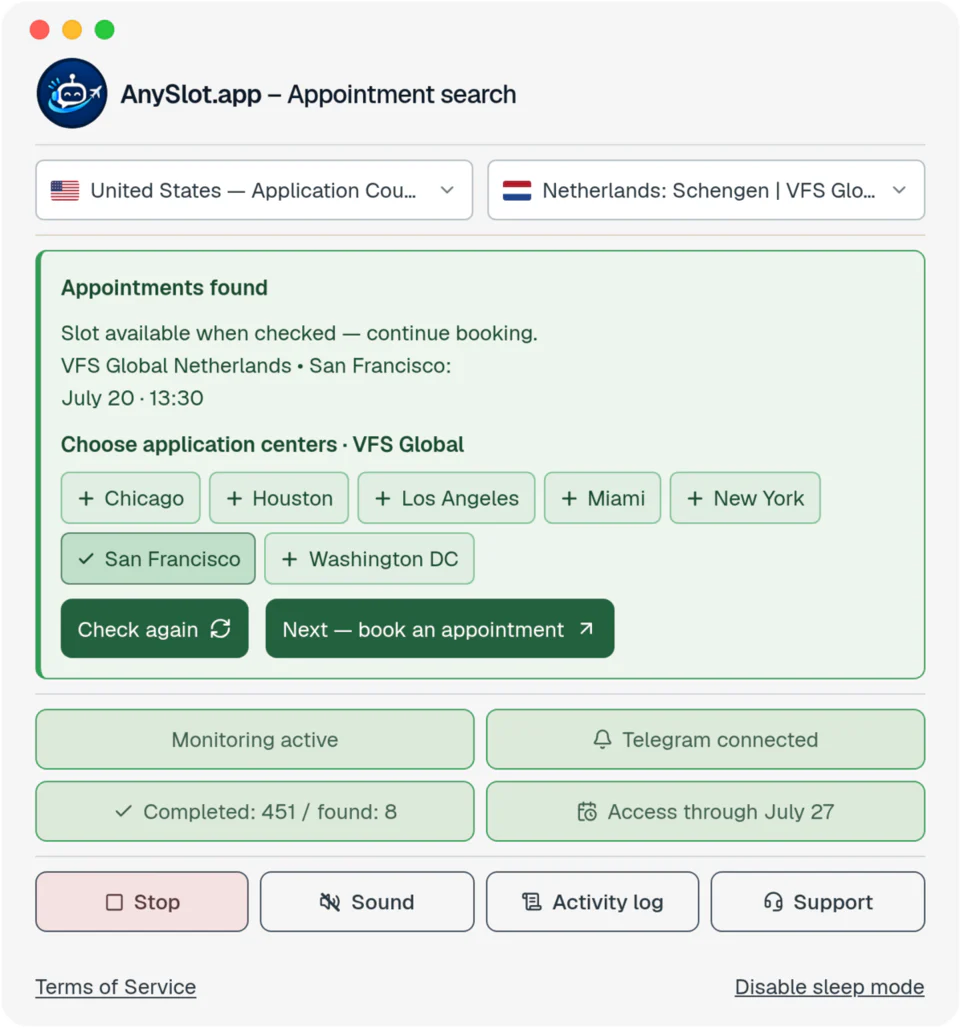
AnySlot only monitors the selected Netherlands Schengen appointment calendar and reports what the site shows at the moment of checking. You still complete your own online form, print and sign it with its unique code, gather the correct checklist documents, and book directly with VFS.

Interactive demo

Try the Netherlands Schengen VFS bot

Get the desktop app

The demo above shows the interface only, with simulated results. Real monitoring runs in the downloaded app, in your own official booking session. On-demand checks are free; automatic monitoring is paid.

  1. Pick the exact calendarIn AnySlot, choose United States as the application country, then the Netherlands and the Schengen visa entry. The bot follows that VFS Global category only, not other services for the same country.
  2. Select centers you can useTick only the US VFS cities you could reach on short notice. Run a free on-demand check first to see how the calendar responds today.
  3. Turn on automatic checksActivate a code to let the desktop app repeat checks for 10 days. Keep the computer awake and online; alerts arrive in the app, with sound and, if you connect it, Telegram.
  4. Book in your own sessionWhen a date is reported, open your own VFS Global account, confirm the center, category and time, and finish the booking yourself. AnySlot never holds or submits an appointment.

Countries and visa appointment routes

Countries and visa appointment routes

Application country

United States

Applying from the United States? Look for your application type, not just the destination flag. Explore 29 appointment routes, grouped below by service.

Schengen short stay

Long stay and residence

Netherlands from the US

Five things to settle before searching

Main destination

Apply through the Netherlands only if the Netherlands is the main destination of your trip. If you are visiting several Schengen countries, use the official Dutch guidance to confirm whether the Netherlands is responsible before you spend time watching this calendar.

Lawful US residence

This route is for people who live in the United States, and NetherlandsWorldwide also lists limited Miami options for certain nearby territories. If your residence situation is unusual or outside the US, verify on the official NetherlandsWorldwide page whether filing in the United States is allowed.

Short stay versus MVV

Use this route only for short-stay Schengen visa applications. If you are moving to the Netherlands or need an MVV, follow the separate Dutch mission and IND process instead of booking a Schengen appointment.

Which centers to watch

AnySlot can monitor configured US VFS cities for this route, but that list is only a software setting, not a statement of your eligibility. Select centers you could actually attend, then confirm on the official Dutch and VFS instructions that your filing location is appropriate.

When a date appears

Be ready before availability appears: complete your own Dutch online form, print and sign it, and organize the checklist for your primary purpose of travel. If a date is reported, open your own VFS session and confirm the live details because the appointment is not held for you.

Interface examples

Inside the AnySlot panel

Netherlands Schengen visa appointments at VFS Global USA — Screenshot — AnySlot application window on macOS
Screenshot — AnySlot application window on macOS
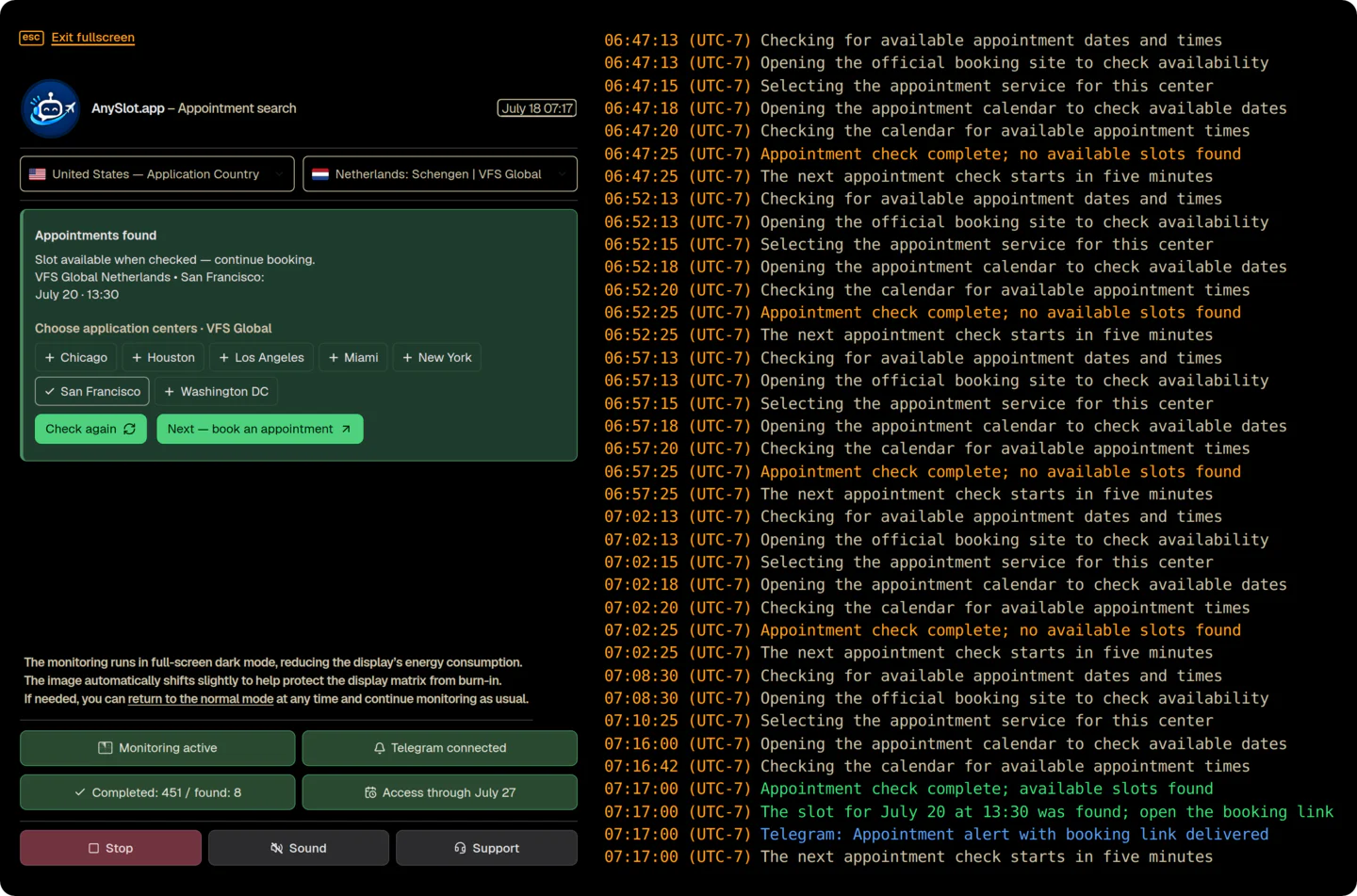
Netherlands Schengen visa appointments at VFS Global USA — Screenshot — AnySlot energy-saving fullscreen mode
Screenshot — AnySlot energy-saving fullscreen mode

Functions and advantages

Netherlands short-stay alerts, MVV kept separate

  • Schengen visa category only

    The app monitors the Netherlands VFS short-stay Schengen calendar selected for this route. It does not treat MVV collection or other Netherlands services as the same process, which helps avoid following the wrong appointment type.

  • Search the cities you pick

    You can monitor the configured US VFS centers that fit your plans, instead of checking each one manually. That setting only changes where the app looks for appointments; it does not decide whether you are allowed to file at a particular location.

  • Check history for trip planning

    Each result is saved with a date so you can review what the calendar showed over time. That record is useful for timing your next check while you prepare the Dutch form, choose the right checklist for your main travel purpose, and keep each applicant’s file separate.

Netherlands Schengen bot

Start monitoring the Dutch VFS calendar

$25 covers 10 consecutive days of automatic checks for this Netherlands Schengen search, starting when you first activate the code. Free on-demand checks remain available. This payment is only for the AnySlot desktop software, not for a VFS Global appointment, VFS service charges, or Dutch consular fees.

  • 10 days of monitoring with unlimited slot alerts.
  • Desktop sound and Telegram alerts
  • Code works on Mac or Windows

$25$5010 days of bot checks

Free on-demand checks after download

What you gain

AnySlot checks the Netherlands Schengen VFS calendar from your own computer and saves each result in a dated history. It is independent desktop software, not an official intake channel, and it cannot create availability or reserve a time once it is detected.

Let the bot refresh the VFS page

That separation helps you focus on the actual Dutch application steps: confirming that the Netherlands is the correct main destination, preparing the right checklist for your primary purpose of travel, and having a separate file ready for each applicant before an appointment opens.

Checks while you work or rest

Let AnySlot check while you work or sleep. Keep your computer on, online, and awake.

Alerts on screen, with sound, and in Telegram

See results on screen, hear an alert if sound is on, and get a message on your phone if Telegram is connected.

Your account, your booking

Sign in to your own account and complete the booking yourself. Your password and application details stay with you.

Each center reported separately

When several selected centers are checked, each available appointment is shown with its center.

A clear activity log

See when each check ran, what it found, and whether the booking site reported an error.

Free mode

Run a free check whenever you need one, including on beta routes.

How it works

From download to your own booking

  1. Step 1

    Pick the exact calendar

    In AnySlot, select United States as the application country, then Netherlands and the Schengen visa category. This route is for Dutch short-stay type C appointments through VFS Global, not for MVV or other Netherlands services.

  2. Step 2

    Select centers you can use

    Choose only the VFS centers you could realistically attend if an appointment appears. A free on-demand check lets you see whether the selected Dutch Schengen calendar currently shows no appointments, returns an empty result, or reports an opening.

  3. Step 3

    Turn on automatic checks

    Activate a code to run checks every five minutes for 10 consecutive days on your Mac or Windows computer. Leave the app running and the computer awake and online so alerts can appear in the app, by sound if enabled, and on Telegram if connected.

  4. Step 4

    Book in your own session

    If the app reports a date, sign in to VFS Global yourself and confirm the center, category, applicant details, and actual availability before you book. AnySlot does not hold a slot, submit your file, or complete the appointment for you.

FAQ

Netherlands Schengen from the US: questions

Support

Need help installing or activating AnySlot?