National visa · US → Malta · VFS Global

Malta long-stay visa appointments through VFS Global in the US

Planning to stay in Malta for more than 90 days is a different process from booking a Schengen visit. Identità handles Maltese D-visa applications through its Central Visa Unit and extended-service partners. Its official branch directory includes US locations and directs applicants to Malta's VFS Global extended-service portal. Start with that route, confirm the purpose of your stay, and check the current instructions before monitoring an appointment.

Free on-demand checks$25 for 10 days of automatic monitoringUnlimited slot alerts

A Malta D-visa appointment is not a Schengen booking

Service
Malta national visa, type D
Booking channel
VFS Global extended service for Identità
Location
US application centers offered for the Malta service
Software
AnySlot.app Auto Slot Monitoring Bot
Runs on
macOS 13+ and Windows 10+ x64
Alerts
App, sound and Telegram notifications

Identità distinguishes its long-stay D-visa process from the short-stay Schengen route. For the extended service, its branch directory links US applicants to the VFS portal ending in /usa/en/mes/. A Malta flag on a different booking page is not enough to establish that you have selected the right service. Check the category in the official session before you start looking for dates.

The reason for your stay matters before the appointment stage. Work, study, and other long stays have different supporting documents and may involve earlier approvals. For employment, Identità explains that the relevant approval in principle comes before the D-visa application. An available appointment does not replace that approval or establish your eligibility for a particular visa.

Use the current Malta-specific US instructions to choose a center. Identità's extended-service directory explicitly identifies New York and San Francisco, while the VFS portal is where you confirm the locations and services currently offered to your application. Do not assume that every VFS office in the United States handles this category simply because it accepts applications for another country.

AnySlot helps with the repeated calendar checks, not the visa decision. Choose United States and Malta's long-stay service, then monitor only the centers you can actually use. When a slot appears, open the official booking session, review the service and location, and complete the reservation yourself. A displayed date is a result at the time of checking, not a held appointment.

Interactive demo

Try the US to Malta long-stay demo

Get the desktop app

The demo above shows the interface only, with simulated results. Real monitoring runs in the downloaded app, in your own official booking session. On-demand checks are free; automatic monitoring is paid.

  1. Choose Malta long staySelect United States and Malta long stay. Check that the official service is Malta’s VFS extended-service route, not the Schengen calendar.
  2. Prepare your applicationFollow Identità’s instructions for your purpose of stay and any approval required before the D-visa stage.
  3. Start monitoringTry a free check, then activate 10 days of automatic checks if needed. Keep the app open and the computer awake and online.
  4. Confirm on the official siteAfter an alert, verify the center, service and live date in your own VFS session and complete the booking yourself.

Countries and visa appointment routes

Countries and visa appointment routes

Application country

United States

Applying from the United States? Look for your application type, not just the destination flag. Explore 29 appointment routes, grouped below by service.

Schengen short stay

Long stay and residence

Malta D visa from the United States

Five checks before a Maltese long stay

Confirm that a D visa matches your stay

Read Identità's guidance for your nationality, purpose, and planned duration. A short-stay Schengen visa and a Maltese D visa are not interchangeable. Being visa-exempt for a visit does not by itself establish permission to stay for more than 90 days. Check whether a D visa is required before traveling instead of relying on tourist entry as a substitute.

Finish any earlier approval stage

Check the sequence for your application before reserving a submission slot. For a work-related D visa, Identità's FAQ refers to an approval in principle before the visa application. Use the checklist for your own purpose rather than assuming that a student's documents, an employment approval, or a different long-stay category can be substituted for one another.

Enter through the extended-service directory

Follow Identità's application link for a US branch to reach the Malta VFS extended-service portal. In the booking account, verify the long-term extended or standard D-visa service shown for your case. Keep the same country, category, and eligible center when selecting the AnySlot route; monitoring a different calendar will not help you book the required service.

Allow time after the VFS appointment

The submission appointment is not the end of the process. Identità says D-visa processing may take up to eight weeks from the VFS appointment and explains that paying extra does not create an expedited route through that period. Check the latest guidance before making fixed travel commitments, and do not interpret an early appointment alert as a promised visa-issue date.

Recheck the details before you reserve

Use an availability alert to return to the official account and confirm the date, center, service, and current document instructions. Slots can disappear while another applicant is booking. If the calendar has changed, continue checking without treating the earlier alert as a reservation, and keep any actual VFS confirmation separate from the AnySlot activity log.

Interface examples

Inside the AnySlot panel

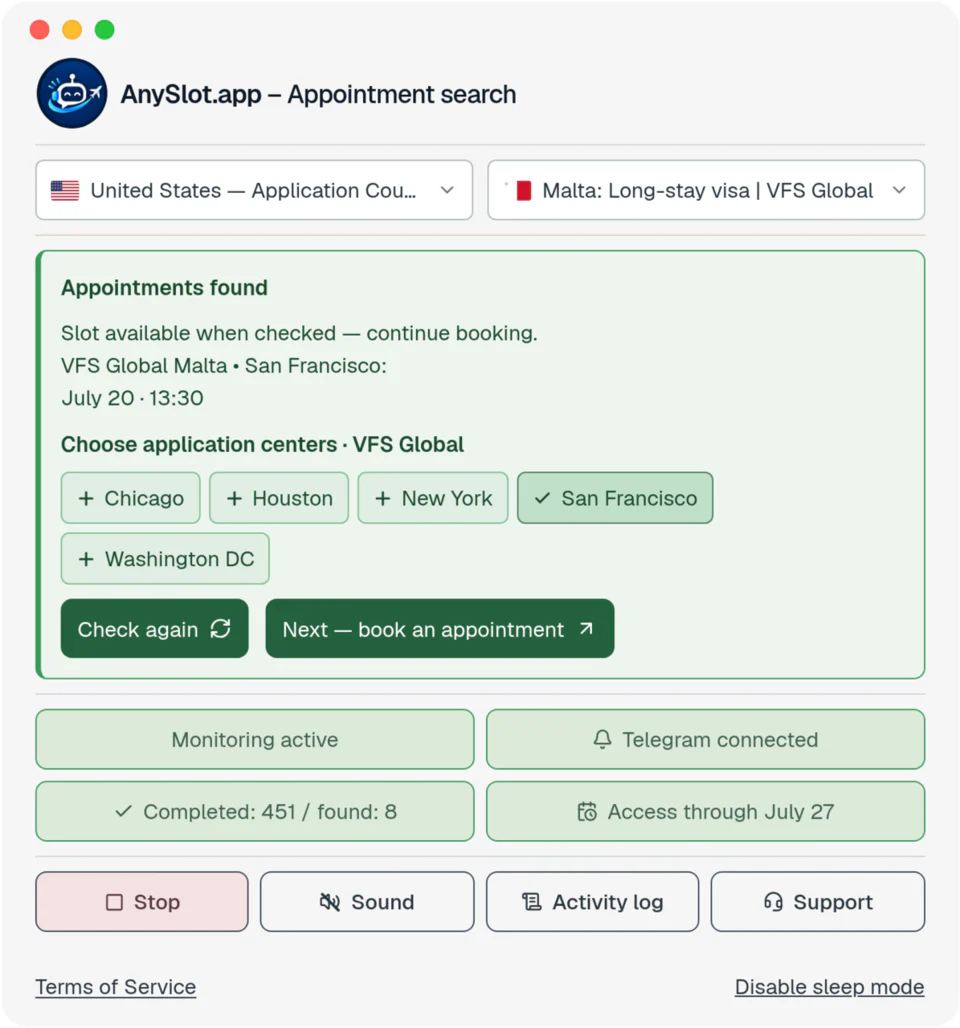
Malta long-stay visa appointments through VFS Global in the US — Screenshot — AnySlot application window on macOS
Screenshot — AnySlot application window on macOS
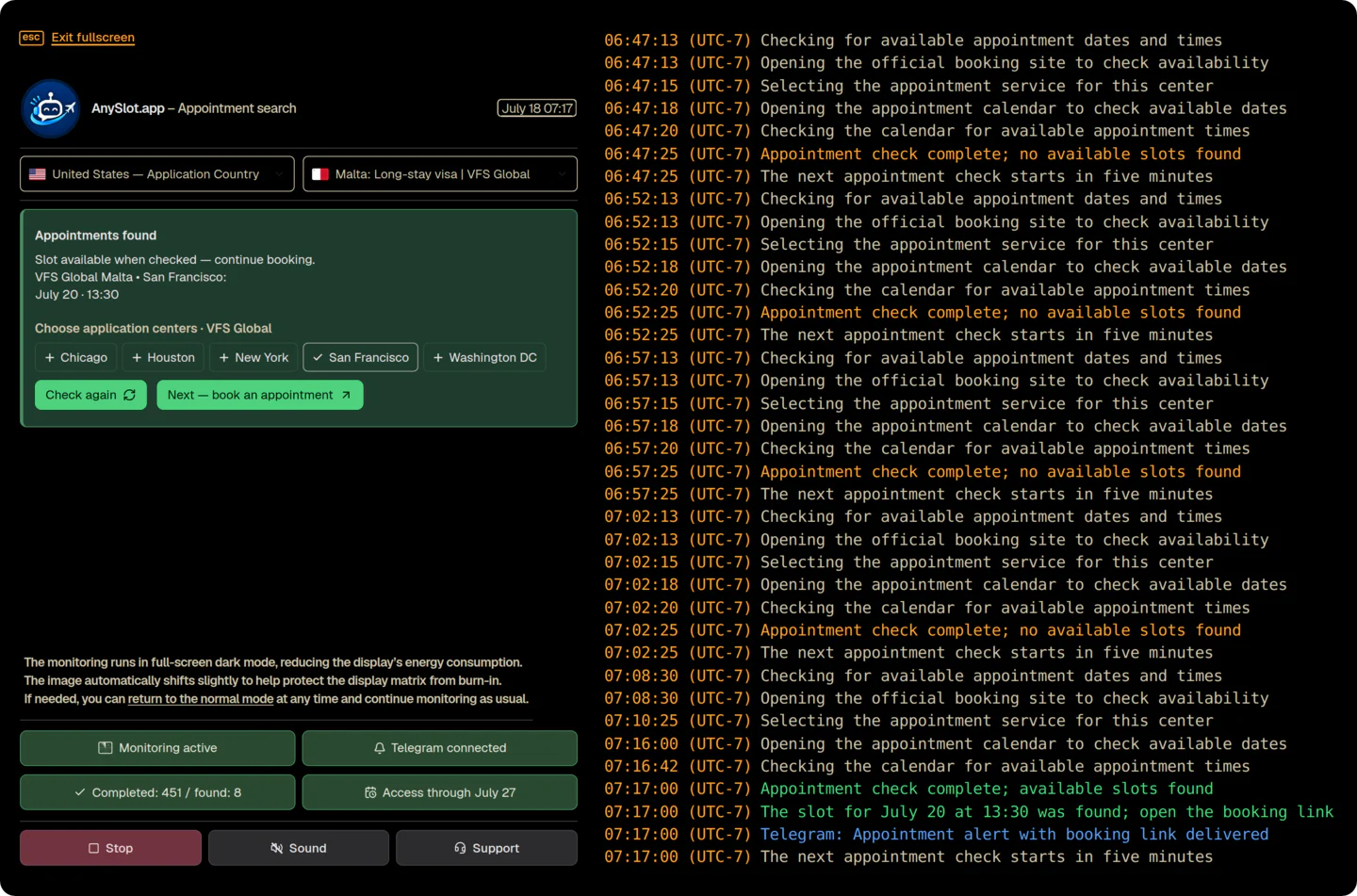
Malta long-stay visa appointments through VFS Global in the US — Screenshot — AnySlot energy-saving fullscreen mode
Screenshot — AnySlot energy-saving fullscreen mode

Functions and advantages

Monitoring Malta's extended-service route

  • The Malta D-visa calendar

    Select Malta's long-stay service rather than a general Schengen route. AnySlot follows the configured VFS extended-service calendar; you still verify the exact category in your official booking account. An alert does not establish that your documents meet Identità's requirements or that an earlier approval stage is complete.

  • Centers for your submission

    Choose which configured US centers to check and confirm that the official Malta service currently accepts your application there. A center used for another country's visa is not automatically suitable for Malta. The result identifies the location where availability was detected so you can review that same center before booking.

  • A record of each calendar check

    The dated activity log shows completed checks, detected slots, and checks that could not finish. Use it to distinguish an empty calendar from a failed check while preparing your long-stay application. These entries concern appointment availability only; they do not track Identità's processing or replace an official VFS reservation confirmation.

Malta long-stay visa

Monitor Malta's extended-service dates

$25 provides 10 consecutive days of automatic checks for the selected US to Malta long-stay route, starting when the code is first activated. On-demand checks stay free. The price covers AnySlot software only, not an appointment, VFS charges, government fees, or a visa decision. Review the current official requirements and complete any booking yourself.

  • 10 days of monitoring with unlimited slot alerts.
  • Desktop sound and Telegram alerts
  • Code works on Mac or Windows

$25$5010 days of bot checks

Free on-demand checks after download

What you gain

A Malta long-stay application often involves coordinating documents, earlier approvals, and travel plans around a VFS submission date. AnySlot can repeat the availability check on your computer and record what happened each time. Its activity log separates a completed check with no available date from a check that could not finish; neither result should be mistaken for a decision on your visa application.

Keep the extended-service calendar in view

On-demand checks are free. A paid activation provides 10 consecutive days of automatic monitoring for the selected service, with on-screen results, an optional sound, and Telegram alerts when connected. The computer must remain awake and online. Monitoring neither reserves a date nor speeds up Identità's processing, and it does not include VFS, government, courier, or other application fees.

Checks while you work or rest

Let AnySlot check while you work or sleep. Keep your computer on, online, and awake.

Alerts on screen, with sound, and in Telegram

See results on screen, hear an alert if sound is on, and get a message on your phone if Telegram is connected.

Your account, your booking

Sign in to your own account and complete the booking yourself. Your password and application details stay with you.

Each center reported separately

When several selected centers are checked, each available appointment is shown with its center.

A clear activity log

See when each check ran, what it found, and whether the booking site reported an error.

Free mode

Run a free check whenever you need one, including on beta routes.

How it works

From a calendar check to your VFS reservation

  1. Step 1

    Choose the Malta D-visa route

    In AnySlot, set United States as the application country and choose Malta's long-stay service. Select the configured centers that match the current official instructions for your application. This route follows the Malta extended-service calendar, not a general Schengen search.

  2. Step 2

    Check the calendar

    Run a free on-demand check in your own booking session. Review the result and activity log together: no availability means that the completed check found no date, while a connection or site error means the calendar was not successfully checked.

  3. Step 3

    Monitor while you prepare

    Activate a code if you want 10 days of automatic checks rather than starting each check yourself. Keep the computer awake and connected, and connect Telegram if you want the booking link sent to your phone when the bot finds a slot.

  4. Step 4

    Finish on the official site

    Open the VFS booking link, sign in if needed, and verify the Malta service, location, and appointment time. You complete the reservation yourself and keep the confirmation issued by the official system. AnySlot does not reserve the slot or submit your visa application.

FAQ

Malta long-stay applications from the US: questions

Support

Need help installing or activating AnySlot?