Schengen visa · US → Estonia · VFS Global

Estonia Schengen visa appointments at VFS Global USA

Estonia’s embassy in Washington directs US visa intake through VFS Global. AnySlot monitors the Estonia Schengen short-stay calendar for the US centers you select and alerts you when a date is detected, so you can review and book it yourself in the official VFS session.

Free on-demand checks$25 for 10 days of automatic monitoringUnlimited slot alerts

Estonian short stays at VFS USA

Service
Estonia Schengen visa (type C)
Booking channel
VFS Global for the Embassy of Estonia
Location
VFS Global centers in the United States
Software
AnySlot.app Auto Slot Monitoring Bot
Runs on
macOS 13+ and Windows 10+ x64
Alerts
App, sound and Telegram notifications

For applicants using the US intake route, Estonia’s Washington mission uses VFS Global for visa application handling. This page is for the Estonia Schengen short-stay appointment calendar within that provider system.

Use this route for a Schengen stay of up to 90 days in any 180-day period when Estonia is the main destination of the trip. If your plan is for a longer national stay, that is a separate D-visa process with different eligibility and document rules.

The embassy’s published apostille, legalization, and translation rule in the reviewed material is specifically for foreign public documents submitted with a D-visa application. Do not assume the same rule applies to every C-visa document; check the current short-stay checklist for your case.

AnySlot monitors only the calendar for the US centers you select and records the results of each check. It does not decide whether you may apply in the United States, and it does not book the appointment on your behalf.

Interactive demo

Try the Estonia Schengen VFS bot

Get the desktop app

The demo above shows the interface only, with simulated results. Real monitoring runs in the downloaded app, in your own official booking session. On-demand checks are free; automatic monitoring is paid.

  1. Pick the exact calendarIn AnySlot, choose United States as the application country, then Estonia and the Schengen visa entry. The bot follows that VFS Global category only, not other services for the same country.
  2. Select centers you can useSelect the US VFS cities you can attend for an Estonian appointment. Run a free on-demand check first to see how the calendar responds today.
  3. Turn on automatic checksActivate a code to let the desktop app repeat checks for 10 days. Keep the computer awake and online; alerts arrive in the app, with sound and, if you connect it, Telegram.
  4. Book in your own sessionWhen a date is reported, open your own VFS Global account, confirm the center, category and time, and finish the booking yourself. AnySlot never holds or submits an appointment.

Countries and visa appointment routes

Countries and visa appointment routes

Application country

United States

Applying from the United States? Look for your application type, not just the destination flag. Explore 29 appointment routes, grouped below by service.

Schengen short stay

Long stay and residence

Estonia from the US

Short stay in Estonia

Embassy in Washington

For the US route, Estonia’s Washington mission uses VFS Global for visa application intake. Use the provider and mission instructions currently published for Estonia in the United States before relying on any center list shown in the app.

C, not D

This page covers the Schengen short-stay route for travel to Estonia. If your stay is planned to exceed the Schengen short-stay limit, use the separate Estonia D process instead of assuming the categories are interchangeable.

Your form and US status documents

Complete the Estonian Schengen application online, then print and sign it as the embassy instructs. Check the evidence required for your US status as well: the embassy lists additional documents for F and J visa holders and asks for originals and copies. Use the C checklist rather than borrowing the D-visa document rules.

Pick centers

Choose only the US VFS centers you could realistically attend. The configured list in the software is for monitoring purposes and does not by itself confirm that every center is appropriate for your personal case or currently accepting your category.

Book yourself

When you receive an alert, open the official VFS booking flow and confirm the center, category, and available time there. A reported opening is not reserved for you, and the final booking happens only if the provider still offers it in your session.

Interface examples

Inside the AnySlot panel

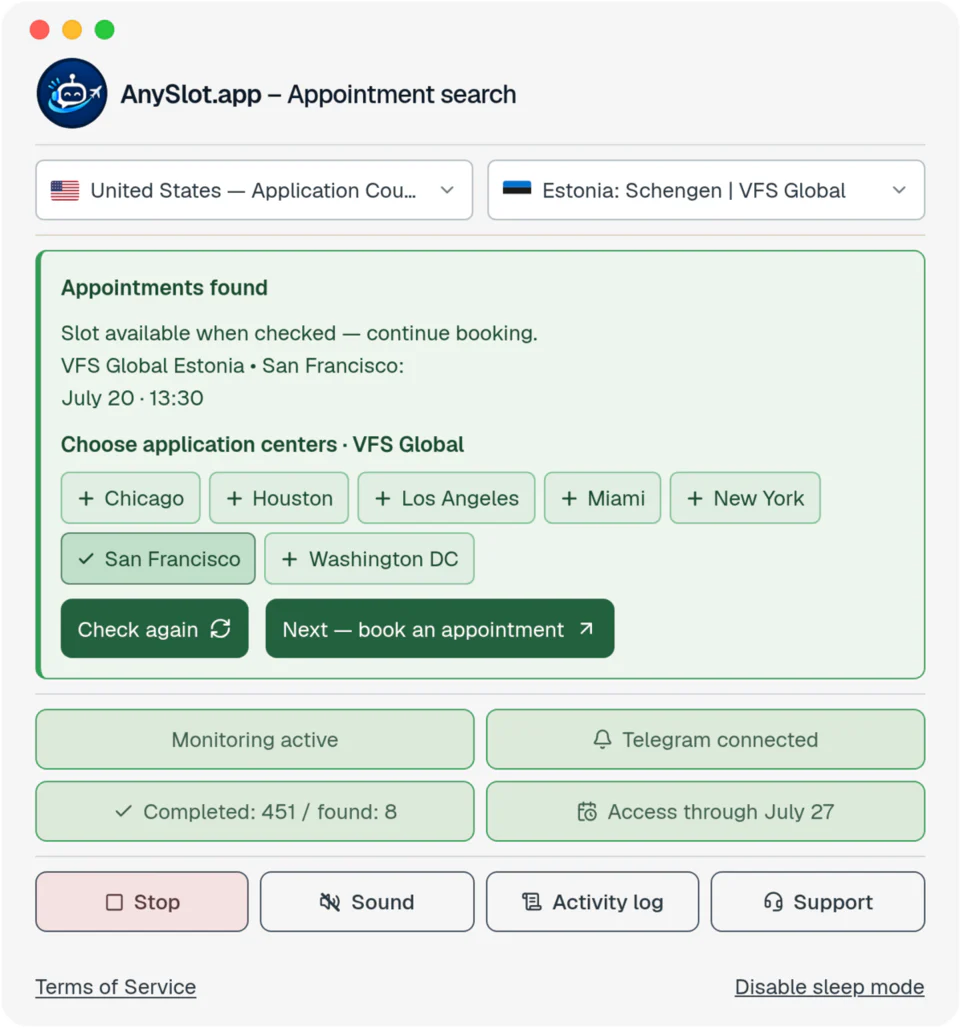
Estonia Schengen visa appointments at VFS Global USA — Screenshot — AnySlot application window on macOS
Screenshot — AnySlot application window on macOS
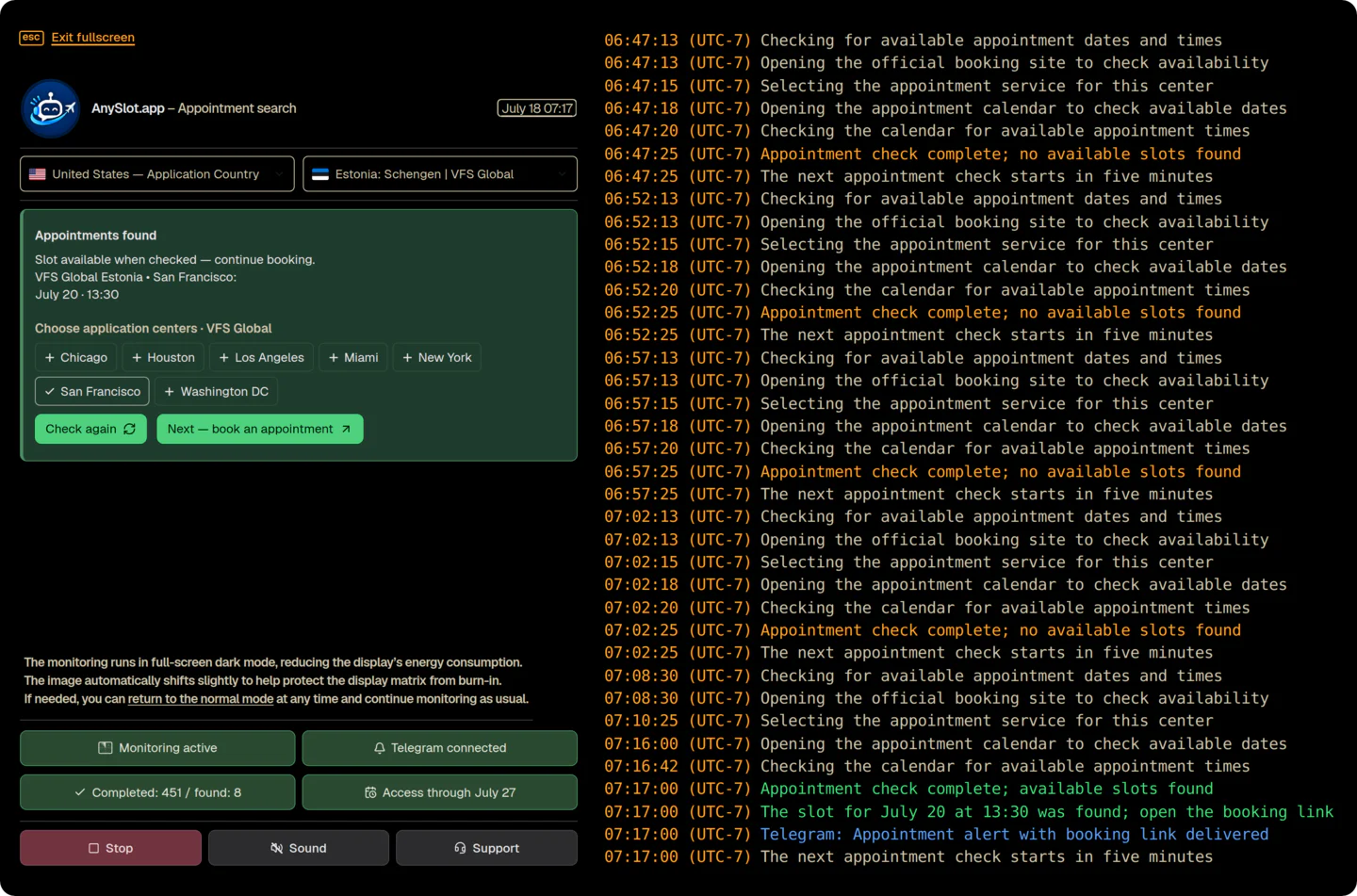
Estonia Schengen visa appointments at VFS Global USA — Screenshot — AnySlot energy-saving fullscreen mode
Screenshot — AnySlot energy-saving fullscreen mode

Functions and advantages

Estonian short-stay visa alerts

  • Type C only

    This monitor is limited to Estonia’s Schengen short-stay appointment route. It does not track Estonia’s long-stay D category, residence permits, or other consular services, so alerts stay tied to the specific calendar you selected.

  • Cities for Estonia

    Select the US VFS centers configured for Estonia that you would realistically attend. The app checks only those selected centers, which helps you focus alerts on locations that are useful to you without suggesting any center is officially appropriate for every applicant.

  • Estonian C check history

    Each short-stay calendar check is logged with its time and outcome. That record helps you distinguish between an empty result, a reported opening, and a failed check, so you can judge whether to retry, keep monitoring, or sign in to VFS right away.

Estonia Schengen bot

Start monitoring Estonian short-stay dates

$25 covers 10 consecutive days of automatic checks for this Estonia Schengen search, starting when you first activate the code. Free on-demand checks remain available. This purchase is for AnySlot desktop software only. It does not include a VFS Global booking, visa handling, consular fees, or any guarantee that an appointment will still be available when you sign in.

  • 10 days of monitoring with unlimited slot alerts.
  • Desktop sound and Telegram alerts
  • Code works on Mac or Windows

$25$5010 days of bot checks

Free on-demand checks after download

What you gain

AnySlot checks the Estonia Schengen appointment calendar from your computer and saves each result in a dated log. It is independent desktop software, not an embassy or VFS service, and it cannot create appointment capacity or tell you whether you qualify to apply through the US route.

Stop refreshing the Estonian calendar

That helps you spend less time manually rechecking the provider site and more time confirming that Estonia is the correct main destination and that your short-stay documents match the current official checklist. When an alert appears, you still complete the booking yourself on the official site.

Checks while you work or rest

Let AnySlot check while you work or sleep. Keep your computer on, online, and awake.

Alerts on screen, with sound, and in Telegram

See results on screen, hear an alert if sound is on, and get a message on your phone if Telegram is connected.

Your account, your booking

Sign in to your own account and complete the booking yourself. Your password and application details stay with you.

Each center reported separately

When several selected centers are checked, each available appointment is shown with its center.

A clear activity log

See when each check ran, what it found, and whether the booking site reported an error.

Free mode

Run a free check whenever you need one, including on beta routes.

How it works

From download to your own booking

  1. Step 1

    Pick the exact calendar

    In AnySlot, choose the United States as the application country, then Estonia and the Schengen visa route. This tracks the Estonia short-stay VFS calendar only, not Estonia’s D-visa process or other services that may appear on the provider site.

  2. Step 2

    Select centers you can use

    Choose the VFS Global centers in the United States that you are actually prepared to attend for an Estonia Schengen appointment. Run a free on-demand check first so you can see whether the app returns an empty result, a reported opening, or a failed check that should be retried.

  3. Step 3

    Turn on automatic checks

    Activate a code to run scheduled checks for 10 consecutive days. Checks repeat every five minutes on your Mac or Windows computer while the app stays open, awake, and online. Alerts can appear in the app, play a sound if enabled, and go to Telegram if you connect it.

  4. Step 4

    Book in your own session

    If the app reports an opening, sign in to your own VFS Global session and confirm the exact center, appointment category, applicant details, and live availability before booking. Reported dates are snapshots from the time of checking. AnySlot does not hold capacity, submit an application, or complete the reservation for you.

FAQ

Estonia Schengen from the US: questions

Support

Need help installing or activating AnySlot?